
CI/CD
Introduction
Continuous Integration (CI) is a practice of automatically building and testing the integrated codebase to ensure it is in a workable state. This practice is often followed by Continuous Benchmarking (CB), to evaluate the impact of the code change on the application performance, and Continuous Deployment (CD), to distribute a new version of the developed code.
IT4I offers its users a possibility to set up CI for their projects and execute their CI jobs directly on the computational nodes of the production HPC clusters and Complementary systems. Complementary systems allows to run the tests on emerging, non-traditional, and highly specialized hardware architectures. It consists of computational nodes built on Intel Sapphire Rapids + HBM, NVIDIA Grace CPU, IBM Power10, A64FX, and many more.
Besides that, there is also a possibility to execute CI jobs in a customizable virtual environment – Docker containers. This allows to test the code in a clean build environment. It also makes dependency management more straight-forward since all dependencies for building the project can be put in the Docker image, from which the corresponding containers are created.
CI Infrastructure Deployed at IT4I
IT4Innovations maintains a GitLab server (code.it4i.cz), which has built-in support for CI/CD. It provides a set of GitLab runners – applications that execute CI jobs specified in the project CI pipelines, consisting of jobs and stages. Grouping jobs together in collections is called stages. Stages run in sequence, while all jobs in a stage can run in parallel.
See the detailed documentation about GitLab CI/CD.
Karolina, Barbora, Barbora NG, and Complementary Systems
For all the users, a unified solution is provided to let them execute their CI jobs without the need to create their own project runners. For each of the HPC clusters, GitLab instance runners have been deployed. The runners are running on the login nodes – one runner on each login node – and are visible to all the projects of the IT4I GitLab server. These runners are shared by all users.
These runners are using Jacamar CI driver – an HPC-focused open-source CI/CD driver for GitLab runners. It allows a GitLab runner to interact directly with a job scheduler of a given cluster. One of the main benefits this driver provides is a downscoping mechanism. It ensures that every command within each CI job is executed as the user who triggers the CI pipeline to which the job belongs.
For more information about the Jacamar CI driver, please visit the official documentation.
The execution of the CI pipelines works as follows:
- User in the IT4I GitLab server triggers a CI pipeline (for example, by making push to a repository, etc.).
- The CI jobs, of which the pipeline consists, are picked by the corresponding runners running in the login nodes.
- For every picked CI job, the runners clone the repository (or just fetch changes to the already cloned one, if there are any), restore cache and download artifacts (if specified).
- The runners submit the CI jobs as Slurm jobs to the corresponding HPC cluster using the
sbatchcommand. - At the end of each CI job, the runners create cache and upload artifacts (if specified), and report the job results back to the IT4I GitLab server.
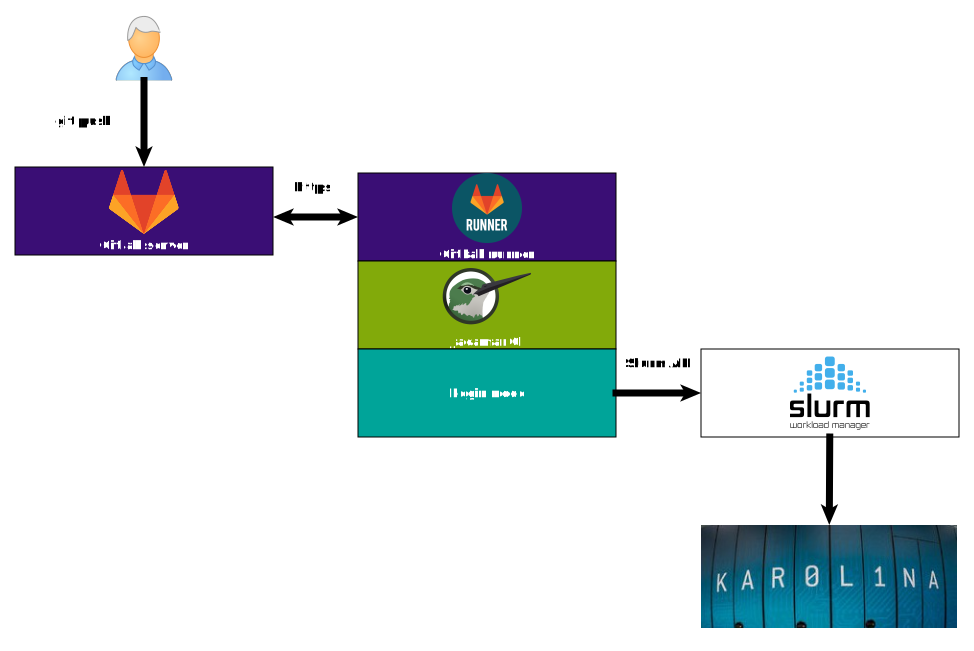
The GitLab runners on Karolina, Barbora, and Barbora NG are able to submit (as a Slurm job) and execute 32 CI jobs concurrently, while the runner on Complementary systems can submit 16 jobs concurrently at most. Jobs above this limit are postponed in submission to respective Slurm queue until a previous job has finished.
Virtual Environment (Docker Containers)
There are also five GitLab instance runners with Docker executor configured, which have been deployed in the local virtual infrastructure (each runs on a dedicated virtual machine). The runners use Docker Engine to execute each job in a separate and isolated container created from the image specified beforehand. These runners are also visible to all the projects of the IT4I GitLab server.
Detailed information about the Docker executor and its workflow (the execution of CI pipelines) can be found here.
In addition, these runners have distributed caching enabled. This feature uses pre-configured object storage server and allows to share the cache between subsequent CI jobs (of the same project) executed on multiple runners (two or more of the five deployed). Refer to Caching in GitLab CI/CD for information about cache and how cache is different from artifacts.
How to Set Up Continuous Integration for Your Project
To begin with, a CI pipeline of a project must be defined in a YAML file.
The most common name of this file is .gitlab-ci.yml and it should be located in the repository top level.
For detailed information, see the tutorial on how to create your first pipeline.
Additionally, CI/CD YAML syntax reference lists all possible keywords,
that can be specified in the definition of CI/CD pipelines and jobs.
The default maximum time that a CI job can run for before it times out is 1 hour. This can be changed in project’s CI/CD settings. When jobs exceed the specified timeout, they are marked as failed. Pending jobs are dropped after 24 hours of inactivity.
Execution of CI Pipelines on HPC Clusters
Every CI job in the project CI pipeline, intended to be submitted as a Slurm job to one of the HPC clusters, must have the 3 following keywords specified in its definition.
-
id_tokens, in whichSITE_ID_TOKENmust be defined withaudset to the URL of the IT4I GitLab server.id_tokens: SITE_ID_TOKEN: aud: https://code.it4i.cz/ -
tags, by which the appropriate runner for the CI job is selected. There are exactly 3 tags that must be specified in thetagsclause of the CI job. Two of these areit4iandslurmjob. The third one represents name of the target cluster. It can bekarolina,barbora,barbora-ng, orcompsys.tags: - it4i - <cluster-name-tag> # karolina | barbora | barbora-ng | compsys - slurmjob -
variables, where theSCHEDULER_PARAMETERSvariable must be specified. This variable should contain all the arguments that the developer wants to pass to thesbatchcommand during the submission of the CI job – project, queue, partition, etc. There are also arguments, which are specified by the Jacamar CI driver automatically. Those are--wait,--job-name, and--output.variables: SCHEDULER_PARAMETERS: "--account=<account> --partition=<partition> --nodes=<#-of-nodes>"
Optionally, a custom build directory can also be specified.
The deployed GitLab runners are configured to store all files and directories for the CI job
in the home directory of the user who triggers the associated CI pipeline
(the repository is also cloned there in a unique subpath).
This behavior can be changed by specifying the CUSTOM_CI_BUILDS_DIR variable in the variables clause of the CI job.
variables:
    SCHEDULER_PARAMETERS: ...
    CUSTOM_CI_BUILDS_DIR: /path/to/custom/build/dir/
A GitLab repository showing examples of CI jobs can be found here.
Execution of CI Pipelines in Docker Containers
Every CI job in the project CI pipeline, intended to be executed by one of the five runners with the Docker executor configured, must have the two following keywords specified in its definition.
-
image, where the name of the Docker image must be specified. Image requirements are listed here. See also the description in CI/CD YAML syntax reference for information about all possible name formats. The runners are configured to pull the images from Docker Hub.image: <image-name> # image name in one of the accepted formats # OR image: name: <image-name> # image name in one of the accepted formats -
tags, by which one of the 5 runners is selected (the selection is done automatically). There are exactly 2 tags that must be specified in thetagsclause of the CI job. Those arecentos7anddocker.tags: - centos7 - docker