
EUDAT & iRODS
The EUDAT Collaborative Data Infrastructure (or EUDAT CDI) is one of the largest infrastructures of integrated data services and resources supporting research in Europe. It is sustained by a network of more than 20 European research organizations, data and computing centers. For more information, see the official EUDAT CDI page.
Before you start:
-
Place a request at EUDAT CDI via their support form (consult their documentation if needed).
-
Follow IT4I iRODS documentation below.
-
If you have additional questions or requests, contact support@it4i.cz.
iRODS
The integrated Rule-Oriented Data System (iRODS) is an open source data management software used by research organizations and government agencies worldwide. iRODS is released as a production-level distribution aimed at deployment in mission critical environments. It virtualizes data storage resources, so users can take control of their data, regardless of where and on what device the data is stored. For more detailed information about iRODS itself, see the official iRODS page or read official documentation.
How to Put Your Data to Our Server
If you have a user account with active project assigned, contact support@it4i.cz, to have your iRODS user password set up. You can manage the data from the Internet or directly from Karolina (as of Q1 2026) access nodes for best performance on already uploaded data.
Access to iRODS Collection From Karolina
Access to iRODS Collection requires access to the Karolina cluster (i.e. IT4I account),
since iRODS clients are provided as a module on Karolina.
The irodsfs module loads config file for irodsfs and icommands, too.
Mounting Your Collection
[userid@login4.karolina ~] $ ml irodsfs

irodsfs configuration file has been created at /home/some_user/.irods/config.yml
iRODS environment file has been created at /home/some_user/.irods/irods_environment.json

to start irodsfs, run:          irodsfs -config ~/.irods/config.yml ~/IRODS
to start iCommands, run:        iinit

For more information, see https://docs.it4i.cz/en/docs/general/irods
Now you can choose between the Fuse client or iCommands:
Fuse
This method will present collection as a mountpoint accessible only by your user on selected access node.
You can work with it as a regular directory using common UNIX commands ls, cd, cp, mv, etc.
[userid@login4.karolina ~]$ irodsfs -config ~/.irods/config.yml ~/IRODS
time="2022-08-04 08:54:13.222836" level=info msg="Logging to /tmp/irodsfs_cblmq5ab1lsaj31vrv20.log" function=processArguments package=main
Password:
time="2022-08-04 08:54:18.698811" level=info msg="Found FUSE Device. Starting iRODS FUSE Lite." function=parentMain package=main
time="2022-08-04 08:54:18.699080" level=info msg="Running the process in the background mode" function=parentRun package=main
time="2022-08-04 08:54:18.699544" level=info msg="Process id = 27145" function=parentRun package=main
time="2022-08-04 08:54:18.699572" level=info msg="Sending configuration data" function=parentRun package=main
time="2022-08-04 08:54:18.699730" level=info msg="Successfully sent configuration data to background process" function=parentRun package=main
time="2022-08-04 08:54:18.922490" level=info msg="Successfully started background process" function=parentRun package=main
After you are finished, unmount the collection from the access node.
$ fusermount -u ~/IRODSiCommands
ssh some_user@karolina.it4i.cz
[userid@login4.karolina ~]$ ml irodsfs
irodsfs configuration file has been created at /home/userid/.irods/config.yml.
      to start irods fs run: irodsfs -config ~/.irods/config.yml ~/IRODS

iCommands environment file has been created at /home/$USER/.irods/irods_environment.json.
      to start iCommands run: iinit

[userid@login4.karolina ~]$ iinit
Enter your current PAM password:
[some_use@login4.karolina ~]$ ils
/IT4I/home/some_user:
test.1
test.2
test.3
test.4Use the command iput for upload, iget for download, or ihelp for help.
Access From Outside
This guide assumes you are uploading your data from your local PC/VM.
You Need a Client to Connect to iRODS Server
There are many iRODS clients, but we recommend the following:
- Cyberduck - Windows/Mac, GUI
- Fuse (irodsfs lite) - Linux, CLI
- iCommands - Linux, CLI.
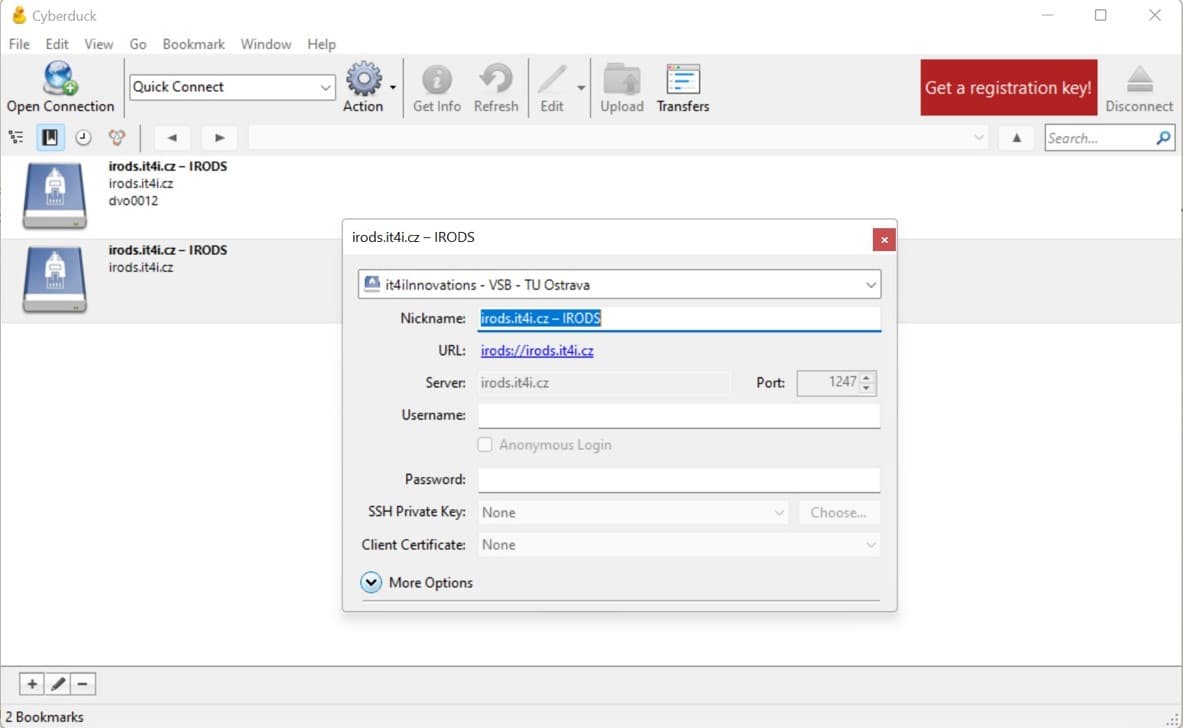
Cyberduck
- Download Cyberduck.
- Download connection profile for IT4I iRods server.
- Left double-click this file to open connection.
Fuse
This is a Linux client only, basic knowledge of the command line is necessary.
Fuse allows you to work with your iRODS collection like an ordinary directory.
cd ~
wget https://github.com/cyverse/irodsfs/releases/download/v0.7.6/irodsfs_amd64_linux_v0.7.6.tar
tar -xvf ~/irodsfs_amd64_linux_v0.7.6.tar
mkdir ~/IRODS ~/.irods/ && cd "$_" && wget https://docs.it4i.cz/config.yml
wget https://pki.cesnet.cz/_media/certs/chain_geant_ov_rsa_ca_4_full.pem -P ~/.irods/
Mounting Your Collection
[some_user@local_pc ~]$ ./irodsfs -config ~/.irods/config.yml ~/IRODS
time="2022-07-29 09:51:11.720831" level=info msg="Logging to /tmp/irodsfs_cbhp2rucso0ef0s7dtl0.log" function=processArguments package=main
Password:

time="2022-07-29 09:51:17.691988" level=info msg="Found FUSE Device. Starting iRODS FUSE Lite." function=parentMain package=main
time="2022-07-29 09:51:17.692683" level=info msg="Running the process in the background mode" function=parentRun package=main
time="2022-07-29 09:51:17.693381" level=info msg="Process id = 74772" function=parentRun package=main
time="2022-07-29 09:51:17.693421" level=info msg="Sending configuration data" function=parentRun package=main
time="2022-07-29 09:51:17.693772" level=info msg="Successfully sent configuration data to background process" function=parentRun package=main
time="2022-07-29 09:51:18.008166" level=info msg="Successfully started background process" function=parentRun package=main
Putting Your Data to iRODS
[some_use@local_pc ~]$ cp test1G.txt ~/IRODSIt works as ordinary file system
[some_user@local_pc ~]$ ls -la ~/IRODS
total 0
-rwx------ 1 some_user some_user 1073741824 Nov  4  2021 test1G.txt
Unmounting Your Collection
To stop/unmount your collection, use:
[some_user@local_pc ~]$ fusermount -u ~/IRODSiCommands
This is a Linux client only, basic knowledge of the command line is necessary.
Ubuntu 22.04 LTS (Jammy) Installation
-
Load your release info**
(yourpc)# source /etc/os-release && echo $VERSION_CODENAME jammy -
Import iRODS keyring
(yourpc)# mkdir -p /etc/apt/keyrings
(yourpc)# wget -qO - https://packages.irods.org/irods-signing-key.asc | \
gpg --no-options --no-default-keyring --no-auto-check-trustdb \
--no-keyring --import-options import-export \
--output /etc/apt/keyrings/renci-irods.pgp --import
(yourpc)# file /etc/apt/keyrings/renci-irods.pgp /etc/apt/keyrings/renci-irods.pgp: OpenPGP Public Key Version 4, Created Tue Sep 1 12:49:28 2015, RSA (Encrypt or Sign, 4096 bits); User ID; Signature; OpenPGP Certificate -
Add package source to package manager
(yourpc)# echo "deb [signed-by=/etc/apt/keyrings/renci-irods-archive-keyring.pgp arch=amd64] \
https://packages.irods.org/apt/ $VERSION_CODENAME main" | \
> tee /etc/apt/sources.list.d/renci-irods.list
(yourpc)# apt update ... Get:5 https://packages.irods.org/apt jammy InRelease [129 kB] Get:6 https://packages.irods.org/apt jammy/main amd64 Packages [47.1 kB] ... All packages are up to date. -
Install
# apt install -y irods-icommands ... The following NEW packages will be installed: irods-externals-boost1.81.0-2 irods-externals-nanodbc2.13.0-3 irods-icommands irods-runtime libfmt8 libfuse2 libltdl7 libodbc2 libspdlog1 0 upgraded, 9 newly installed, 0 to remove and 0 not upgraded. Need to get 34.3 MB of archives. After this operation, 222 MB of additional disk space will be used. Do you want to continue? [Y/n] y ... Get:9 https://packages.irods.org/apt jammy/main amd64 irods-icommands amd64 5.0.2-0~jammy [3278 kB] ... Setting up irods-runtime (5.0.2-0~jammy) ... Setting up irods-icommands (5.0.2-0~jammy) ... RHEL , Rocky, Alma 9 -
Import iRODS keyring
(yourpc)# curl https://packages.irods.org/renci-irods.yum.repo | tee /etc/yum.repos.d/renci-irods.yum.repo -
Install prerequisities and iRODS
(yourpc)# dnf install epel-release (yourpc)# dnf install irods-icommands ... Installed: fmt-8.1.1-5.el9.x86_64 irods-externals-boost1.81.0-2-1.0-1.el9.x86_64 irods-externals-nanodbc2.13.0-3-1.0-1.el9.x86_64 irods-icommands-5.0.2-0.el9.x86_64 irods-runtime-5.0.2-0.el9.x86_64 spdlog-1.10.0-2.el9.x86_64 unixODBC-2.3.9-4.el9.x86_64 Complete! (yourpc)# -
First run
mkdir .irods/ &&
r
cat <<EOF > .irods/irods_environment.json
{
    "irods_encryption_algorithm" : "AES-256-CBC",
    "irods_encryption_key_size" : 32,
    "irods_encryption_num_hash_rounds": 16,
    "irods_encryption_salt_size": 8,
    "irods_host": "gw1.proj2.it4i.cz",
    "irods_port": 1247,
    "irods_user_name": "<YOUR_USER_NAME>",
    "irods_zone_name": "IT4I"
}